Pages

Tuesday, 11 October 2016

Unit 66, 67, 68 - Understand Theory and Applications of 3D

3D Modelling - What is it used for?

3D modelling is extremely useful and can be used for many things. In software such as Maya, you get given a massive amount of tools to use. You can make very detailed models, view the model from any angle, and make very small adjustments. In the first part of this assignment I will talk about different things that 3D modelling is used for.

Product Design

When a company is designing a product, they will want a realistic view of what their product could look like beforehand, so they can make changes to it before creating the final product. This is where 3D modelling comes in. First, basic sketches of the product could be made, then more detailed sketches. Eventually, the sketches can be put into a 3D modelling software such as Maya, and a 3D model can be made from the sketches. When they have a 3D model of their product, final tweaks and changes can be made until they get the design they want. In a way, 3D modelling is like creating a prototype, but instead of a physical prototype, it's on the PC. This is generally easier than creating something physical, because it saves resources and is easy to store since it's digital.

Below you can see an example. A controller is being modelled in the 3D software Maya, and 2 drawings are being used to help create the model. A side image, and a top image.


Architecture

3D modelling for architecture is similar to product design. It's used like a virtual prototype. When building something big, you don't want to mess up, so by creating a 3D model you can get a detailed view of what the finished building will look like, and check if there are any errors in the layout. Below you can see an example of a building that has been created in a 3D modelling program. 

Realistic models of buildings could also be imported into an engine such as the Unreal Engine. By doing this, you can set up first person camera views and actually walk around the house.


Games

Most modern games use full 3D graphics, so 3D modelling is a huge part of the gaming industry. Every 3D object used in a game would have been made using a 3D modelling software. Maya is a good example of a 3D modelling program used for games, and is the most used. 

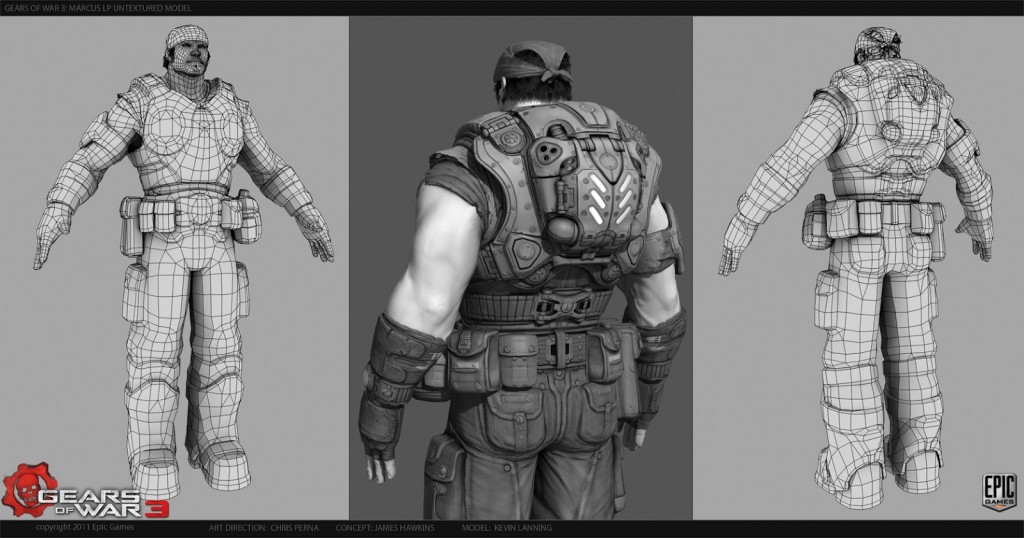
Below is a 3D model from Gears of War 3. On the left and right you can see all the polygons on the model. Polygons are what make up a model, the more polygons, the more detailed and realistic looking the model will be. A model with a low poly count will look more jagged.
Below you can see a model with a lower poly count. As you can see, it doesn't look as smooth as the Gears of War model.

Geometric Theory

When using 3D modelling software such as Maya, there are several basic things you need to understand.

Polygons - In 3D modelling, shapes are made up of polygons. Polygons are 2D shapes that make up the 3D shape. They are essentially the faces. As I've spoke about before, the more polygons, the smoother the model will appear. Higher polygon models also take up more space and are harder to handle, so a mobile game would need models with a much lower polygon count than a game designed to run on high spec PC's.

Primitives - 3D shapes in 3D modelling are known as "primitives." There are a few different types, polygon primitives (3D shapes made up of polygons,) volume primitives and NURBS primitives. 

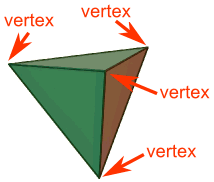
Vertices, Edge and Face - These are different parts of a shape. The vertices/vertex is the name given to each angular point on a shape. The edges are the lines where two faces meet, and the faces are the flat surfaces on the shape. In software such as Maya, these different features of the shape all have their own modes that can be turned on and off. When using one of the modes, that certain part of the shape can be selected and modified individually. 


Meshes - Shapes that are made up of edges, faces and vertices are known as "meshes" in 3D modelling.


Mesh of a turtle.


Wireframe - A wireframe model is a model that has no shading, and all that is shown is the edges of the polygons/faces. 


Wireframe model.


Mesh Construction
There are different ways that meshes can be constructed in 3D modelling software. I will talk about these below.


Box modelling - Box modelling is when simple primitives such as boxes are used to create a very basic version of a final idea for a model. The basic shape is then gradually sculpted into the detailed final model.

Extrusion modelling - Extrusion modelling is when you use images to help create a model. You start with one image and use it to create a 2D outline, then you add a second image at a different angle and extrude the 2D model into 3D. This method of modelling is often used when creating faces, heads and helmets. Sometimes only half of the model is created, then it is duplicated and put together to make sure that the model is symmetrical. 

Using common primitives - Similar to what I spoke about in the box modelling section, the basic primitive shapes such as cubes, pyramids, cylinders and spheres are quite important and are used a lot. Because of the amount of tools and features 3D modelling programs offer, basic primitives can be modified and turned into pretty much whatever the user wants. An example of this is the use of a cube in one of the Maya beginner guides. The task is to create a helmet, but instead of starting with a sphere and modifying that, it is actually easier to start with a cube and smooth it, to make it more spherical. 

Displaying 3D Polygon Animations 

 Application Programming Interface

API stands for application programming interface and is something that works together with the GPU (graphics processing unit or graphics card) to render 3D objects. An example of a well known API is OpenGL. OpenGL is defined as a set of functions which can be called by the client program. Alongside this, a set of named integer constants are used. An example of a named integer constant is GL_TEXTURE_2D, which matches with the decimal number 3553. The functions that OpenGL uses seem similar to ones used in programming languages such as C, however OpenGL's functions are language-independent. Below you can see an image of the OpenGL pipeline. Another example of an API is Microsofts Direct3D.


Info from: https://en.wikipedia.org/wiki/OpenGL

Graphics Pipeline 

 The graphics pipeline is the sequence of steps that are used to turn a 3D model from a game or 3D animation into the final output that the computer displays. Above I briefly mentioned Direct3D, which is Microsofts API. In this section I will talk about the graphics pipeline that the API uses.

Input-Assembler Stage - Supplies data to the pipeline (triangles, lines and points)
Vertex-Shader Stage - Processes vertices, performing operations such as transformations, skinning and lighting.
Geometry-Shader Stage - Processes entire primitives.
Stream-Output Stage - Streams primitive data to memory on the way to the rasterizer.
Memory can be recirculated back into the pipeline as data.   
Rasterizer Stage - Clips primitives and prepares primitives to be pixel shaded. 
Pixel-Shader Stage -  Generates per-pixel data such as colour from interpolated primitive data.
Output-Merger Stage - Generates the final pipeline result by combining output data such as pixel shader values, depth and stencil information.  
There is also a small set of stages known as the tessellation stages. These stages convert high-order surfaces to triangles so they can be rendered within the Direct3D pipeline. The tessellation stages are made up from hull-shader, tesselator, and domain-shader stages.

Info from: https://msdn.microsoft.com/en-us/library/windows/desktop/ff476882%28v=vs.85%29.aspx?f=255&MSPPError=-2147217396

Rendering Techniques


To save time, there are a few different techniques for rendering/transporting light:


Rasterization - Rasterization is when you take a raster graphics format image, and convert it into a raster image of pixels and dots, so the image can be output on a video display, printer, or stored in a bitmap file. Both models and 2D rendering primitives can be rasterized. Rasterization geometrically projects objects in a scene onto an image plane, and doesn't utilize any advanced optical effects.

Ray casting -  Ray casting observes the scene from a specific point of view, and it calculates the image based on geometry and simple reflections. Monte Carlo techniques may also be used.

Ray tracing -  Similar to casting, but uses more advanced optical simulation and usually uses Monte Carlo techniques.

Monte Carlo Techniques - Monte Carlo techniques are computational algorithms that obtain numerical results by using random repeated sampling. Monte Carlo is often used in physical and mathematical problems, usually when it is difficult or impossible to use other methods. 

Info from: https://en.wikipedia.org/wiki/Rendering_(computer_graphics)#Techniques

Rendering Engines

V-Ray

V-Ray is a rendering plug-in used in 3D graphics software. It is used for film and video game production, product and industrial design, and architecture. V-Ray uses path tracing and photon mapping, which are both global illumination algorithms. V-Ray is quite popular for creating environments and is the go-to engine for lots of people. 

Arnold

Arnold uses Monte Carlo Ray Tracing, and because of the way it is optimized it is able to send billions of spatially incoherent rays through a scene. It uses one level of diffuse inter-reflection to allow light to bounce of a wall or object and indirectly illuminate a subject. Arnold is mainly used by big studios for films, and has been used in Pacific Rim, Gravity, Cloudy with a Chance of Meatballs and more.

RenderMan

RenderMan is the rendering engine that Pixar use for rendering all of their in-house productions. The engine was originally only used by Pixar and licensed to third parties, however a free, non commercial version has been released. RenderMan uses the RenderMan Interface Specification to define cameras, geometry, materials and lights. The engine also supports Open Shading Language. The engine used to support the Reyes algorithm, with supported ray tracing and global illumination. However, support for this algorithm was removed in 2016. It now uses Monte Carlo path tracing.

Parallel Rendering

Parallel programming or computing is a way of efficiently solving computer problems/calculations, by solving them all at the same time and breaking them down into smaller parallel tasks. This can be applied to computer graphics to get parallel rendering. This is useful because rendering can be very intensive and require lots of resources. There are some parts of rendering that are embarrassingly parallel, which means that the calculations take little to no effort at all to break down, some examples are pixels, objects and frames. A GPU (graphics processing unit/graphics card) can handle embarrassingly parallel problems such as 3D rendering.

Info from: https://en.wikipedia.org/wiki/Parallel_rendering


IBM's Supercomputer

 
3D modelling software

Autodesk Maya - Maya is a popular 3D modelling software used to create models, assets and animations used for video games, films and architecture. Maya was originally developed by Alias Systems Corportation in 1998 for the IRIX OS, however at a later date Maya was acquired by Autodesk and support for this operating system was removed. Maya features things such as fluid effects, dynamic cloth simulation, fur and hair simulation, and of course all the basic 3D tools such as a primitives and polygons. Maya can use a few different file formats, and the default is .mb. Maya has also been used to create digital art/paintings. An example of a well known artist that uses Maya is Ray Caesar. 
Maya 2017

Autodesk 3D Studio Max - 3D Studio Max is a more professional tool than Maya. It is used for creating 3D models and animations for games and images, however it is used for films, TV ads and architecture also. 3DS Max is able to use plugins, which are essentially separate features that can be added to the main program. It includes features such as ambient occlusion, subsurface scattering, dynamic simulation, particles, radiosity, global illumination and more. 3DS Max also includes polygon modelling and NURBS modelling like Maya. 
3DS Max

Constraints

When using 3D modelling software to create models are games, you may run into restrictions along the way. If you're creating a mobile game, you will be limited in terms of the overall quality of the game. The polygon count on your models will have to be much much lower than a game that would run on PC and console, because models with a high polygon count take up a lot of space. This is the same for textures, and the overall detail and effects in the game. Places like the Apple App Store have a size limit anyway, so if you were developing a game or an app for Apple phones, it would have to be 4GB or lower. You have to take technical limitations into account on any platform.

You may run into restrictions when trying to use the 3D modelling software itself. If you're computer is lower end and or below the recommended specs for the program you are trying to run, it could be much harder to use or impossible to use. You would also need to make sure that you have plenty of space to store all the assets etc, because big games take up a lot of space. Modern games can take up to 60gb of space, and some even higher. So before a game has been put together and optimized, the individual assets, environments etc could take up much more, especially if you have lots of ideas and make lots of variations. 


Tuesday, 4 October 2016

Killer Clown Game Concept

My initial ideas for my Killer Clown game

https://padlet.com/noel21/t7resz4chnzf - Where I will put all my ideas and inspiration for the game.

Idea 1:

Characters - Mike Tobacco, Debbie Stone (protagonists from the movie)
Nameless character/hunter (game protagonist. Player has the option to call them whatever they want.) 

Setting - Crescent Cove Town, California (Location from the film.)

Plot - 28 years after the killer clown incident from the film (2016,) the killer clowns return to the town of Crescent Cove in an attempt to fully destroy everything and everyone there. The protagonist (player) receives a call from two people who claim to have dealt with the killer clowns before, Mike and Debbie. They talk to you about the possibility of another invasion, and ask you to leave your classified location and travel to Crescent Cove.

Gameplay - In the game, the player starts in the town. While there, the player will have to complete tasks from the townsfolk such as defending them from clowns, or fetching a certain item for them. After completing the quests in the town, the player will be able to travel to different areas. Towards the end, the game could become more linear, and the player will be guided to boss battles etc. The player can enter the police station to refill on ammo, and any of the shops in the town to get health.

The game will be played in third person, and will use the standard PC controls (WASD, space, shift etc.) Or it will be played from a top-down perspective and will control like an ARPG game (mouse to move and target enemies etc.)

Things I Will Need For The Game

Models

  • Townsfolk
  • Clowns
  • Weapons (Crossbow, pistol)
  • Cars
  • Houses
  • Trees
  • Circus tent
  • Other random objects (boxes, bins etc)
Audio
  • Background music
  • Footsteps
  • Shooting sounds (alien ray guns, pistols, bows)
  • Clown laughter/zombie/alien noises
  • Ambient sound
  • Fire
Alternate Game Idea/Idea 2


Characters - Mike Tobacco, Debbie Stone

Setting - Crescent Cove Town, California

Plot - The game will use the same basic plot as the film. Killer clowns have invaded the town of Crescent Cove.

Gameplay - The game will involve the player moving around the town to different locations with the task of defending a house, object or human in that area for a set amount of time. Upon completing an area, the player will be guided to the next area. After completing every area in the town, the player will be tasked with going into a big circus tent, where they will fight a boss. The player gets points for successfully defending areas, and loses points for failing to defend areas. Point's will add up and will be shown to the player at the end of the game. They will be able to put their name and score into a leaderboard. The player can also run out of ammo and of course lose health and die. Ammo and health packs will be placed in set locations around the town, and the player can walk over them to pick them up. 

The game will be a first person shooter and will use standard PC controls.

Things I Will Need For This Game

Models
  • Townsfolk
  • Clowns
  • Weapons (Crossbow, pistol)
  • Cars
  • Houses
  • Trees
  • Circus tent
  • Other random objects (boxes, bins etc)
Audio
  • Background music
  • Footsteps
  • Shooting sounds (alien ray guns, pistols, bows)
  • Clown laughter/zombie/alien noises
  • Ambient sound
  • Fire
Killer Klowns from Outer Space: How Was It Received?

Killer Klowns from Outer Space may not be the best film ever, in fact it isn't really very good at all. However, in terms of critical reception, the film didn't actually do that bad, and actually became a cult favourite. 

I will be getting my information for this first part of the task from the website Rotten Tomatoes. Rotten Tomatoes uses it's own scoring system. If the film get's 60% or higher, it gets a fresh review, if it's 59% or lower it gets a rotten review. Some films get "certified fresh" for holding a steady "Tomatometer of 75% or higher after a set amoutn of reviews.

On the website Rotten Tomatoes, Killer Klowns has a 71% critic rating, with an average rating of 6/10, 12 fresh reviews and 5 rotten reviews. It has a 59% audience rating, with an average rating of 3.0/5, with a total of 42,853 reviews. The sites consensus reads "Killer Klowns from Outer Space's title promises darkly goofy fun - and more often than not, the movie delivers."

Budget - $2 million

Opening Weekend - $2,657,329

Gross - $15,625,095 (USA, 22nd July 1988)
$43,625,095 (Worldwide, 28th October 1988)
$28,000,001 (Non-USA, 27th October 1988)

Weekend Gross - $1,364,238 (USA, 10th June 1988, 926 screens)
$2,240,128 (USA, 3rd June 1988, 922 screens)
$2,657,329 (USA, 27th May 1988, 893 screens)

Admissions
3,682,397 (USA, 22nd July 1988)

Assignment 1, Unit 70: Game Engines

What is a game engine?

Most game development starts in a game engine. The game engine is the backbone of the game, it's what a game is built on, and it's how the developers add things to a game and tweak with different things. Game engines include things such as:

  • Physics
  • Collision
  • Environments
  • Models
  • Sounds
  • Artificial Intelligence (AI)
  • Animation
  • & more
However, there are different engines for different things, and not everything is done in the same engine. An example of something that could be created in another engine is the physics. The physics of a game includes things like collision, and the way things move. For example, how a car handles in a racing game, and how the car acts when it crashes into something. A popular physics engine is the Havok engine, which has been used in many games.

Below I will talk about different game engines, and how they have evolved over time. Firstly, there are 2 different types of game engine, open and closed. An open engine is an engine that everyone has access to e.g. the Unreal Engine, which can be downloaded for free on PC. A closed engine is an engine that is only available to the developers that created it e.g. the RAGE engine (Rockstar Advanced Game Engine.)

Engine 1 - id Tech 1-6

The id Tech engine is quite well known, because it was used to power DOOM and Quake, 2 very popular and influential FPS games. The id Tech engine is a closed engine, and only id Software have access to the full thing, however source code was released for certain games to allow players to create their own maps and mods.


id Tech 1 (DOOM Engine, 1993)

The id Tech engine is famous for powering the original DOOM, a hugely influential first person shooter game that released back in 1993. The engine has continued to be used over the years, and 6 versions have been created. The original version of the id Tech engine, was actually just called the "Doom Engine," because at the time that was the only game that used it. As you can see from the image above, the Doom engine is very dated by today's standards, however, at the time it was revolutionary. 
The game appears to be a first person shooter with 3D environments, however due to technical limitations at the time, the game levels are actually 2D. The characters line of sight needed to be parallel to the floor, the walls had to be perpendicular to the walls, and it wasn't possible to create bigger, multi-level structures or sloped structures. 
The source code for the engine was released to the public, so that people could create their own levels and mods etc. 

The levels used binary space partitioning...

id Tech 2 (Quake I & 2 Engine, 1996, 1997)


The id Tech 2 engine had 2 releases, however both are considered completely separate engines, and only the second one is known as the id Tech 2 engine.

Here you can see Quake I. This used the first version of the id Tech 2 Engine, but is usually just called the Quake Engine. Unlike it's predecessor, the DOOM engine, the Quake engine rendered in full 3D, whereas the DOOM engine was completely 2D, make to look 3D. 


Quake I


Here is a screenshot of Quake II, that runs on the final version of the id Tech 2 engine. As you can see, the quality of textures and the models is much nicer than the original Quake engine.


Quake II


The Quake II engine came with out of the box support for OpenGL/hardware accelerated graphics. The engine also featured subdivision of components, which were put into dynamic link libraries. This meant that id Software could release enough source code to allow fan made mods, but keep the rest of the engine proprietary. 

The Quake II engine still used binary space partitioning, and lightmaps were used for the lighting in the levels.

id Tech 3 (Quake III Arena, 1999)


Screenshot of Quake III Arena.


The id Tech 3 engine was used to power id software's game Quake III Arena. The id Tech 3 engine was based on the previous version id Tech 2, however this time, more of the code was rewritten. id Tech 3 required an OpenGL graphics accelerator to run. 

id Tech 3's graphics in general are based around a shader system. This shader system stores the the appearance of surfaces in text files known as "shader scripts." The shaders are rendered in several layers. Each of the layers contains a texture, blend mode and texture orientation modes.

The in-game videos use a format known as "RoQ." RoQ uses vector quantization to encode video and DPCM to encode audio. 

id Tech 3's models are loaded in a format called "MD3." Instead of using skeletal animation, MD3 uses vertex movements. Compared to the animation in id Tech 2, id Tech 3's is much better because the animator is able to have more than 10 key frames per second. This means that more detailed animations can be made, and they will be more fluid and less shaky. Each model is split up into 3 separate parts, head, torso, legs. This is so each part can be animated differently. The legs could be running while the head and torso use different animations. 

id Tech 3 features different types of shadows. One of them is the common "blob shadow" which just places a black fading circle under the player. The two other types are able to cast an accurate shadow of the player model.

The engine uses a "snapshot" system which send information about the game frames to the client. The object interaction on the server is updated at a rate independent of the rate of the clients, and sends the information about the state of the objects at that point in time to all the clients.

Quake III Arena is an online game, so of course it has an anti-cheat system. The anti-cheat is called "pure server," and is automatically enabled for everyone that joins the server. Pure mode checks the files of everyone that joins, and if someones data pack fails one of the checks, they will be removed from the server.

id Tech 4 (DOOM 3 Engine, 2004)


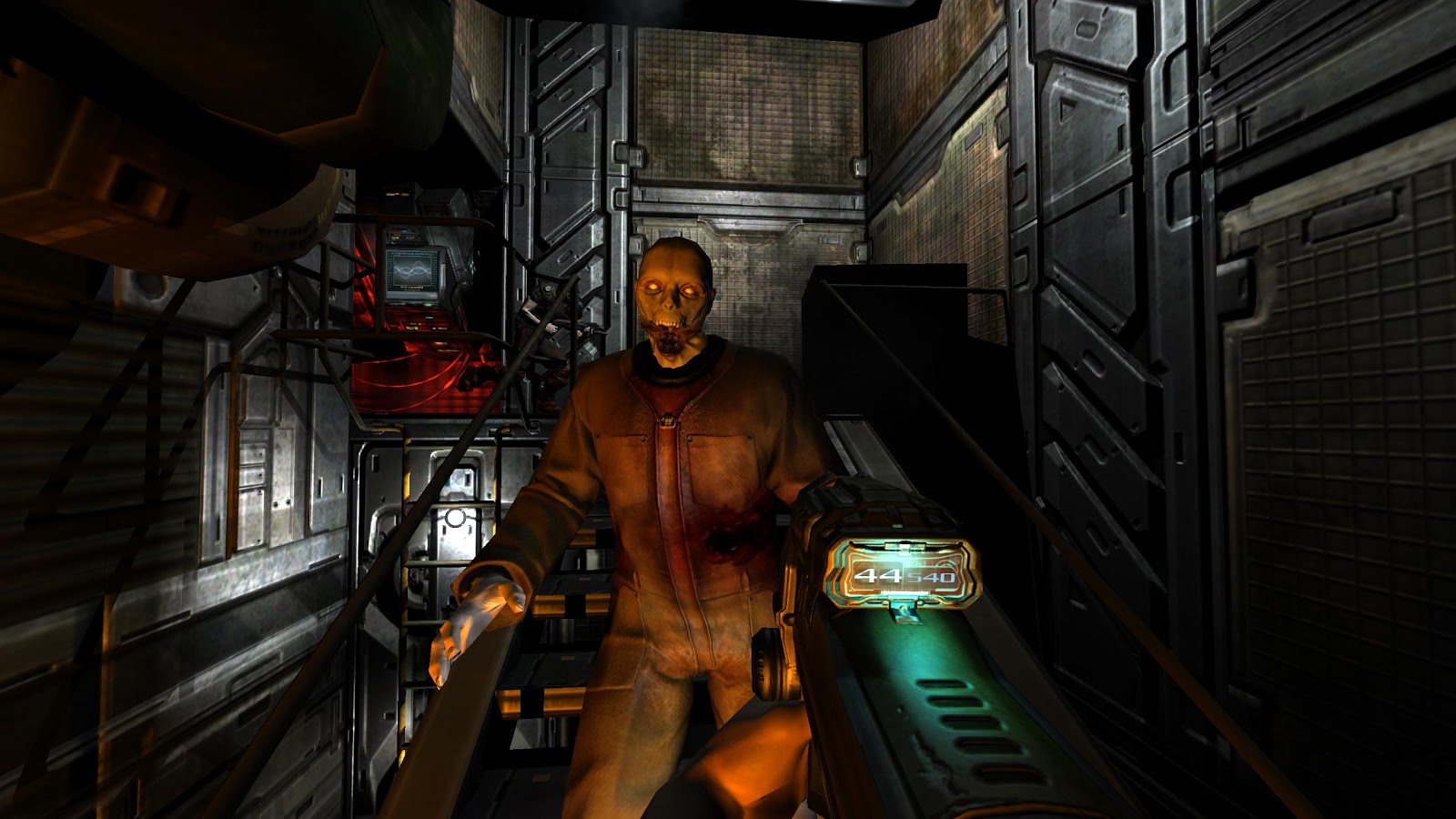
Screenshot of DOOM 3.
id Tech 4 featured improved graphics and more features than id Tech 3. Some of the new features are bump mapping, normal mapping and specular highlighting. id wanted to use dynamic, per-pixel lighting for id Tech 4, instead of the pre-calculated lighting that older engines used. As a result, DOOM 3 looked much more realistic since things were being rendered in real time. 

id Tech 4's models use skeletal animation, however this proved to be quite CPU intensive, and therefore id had to optimise it.

id Tech 4 was created to be used in DOOM 3, which is a game that takes place in primarily dark environments. Because of this, the engine couldn't really handle large outdoor daytime areas. Something known as MegaTexture rendering technology was used, which actually made id Tech 4 into the best engine for handling large outdoor areas. MegaTexture allowed detailed environments, which included things like dynamic sounds. For example, the walking sound would change depending on what surface the player was walking on. 

For scripting, a language similar to C++ was used. Scripting is used for mod creation and for controlling the enemies, weapons and map events in DOOM 3. 

id Tech 5 (2011)


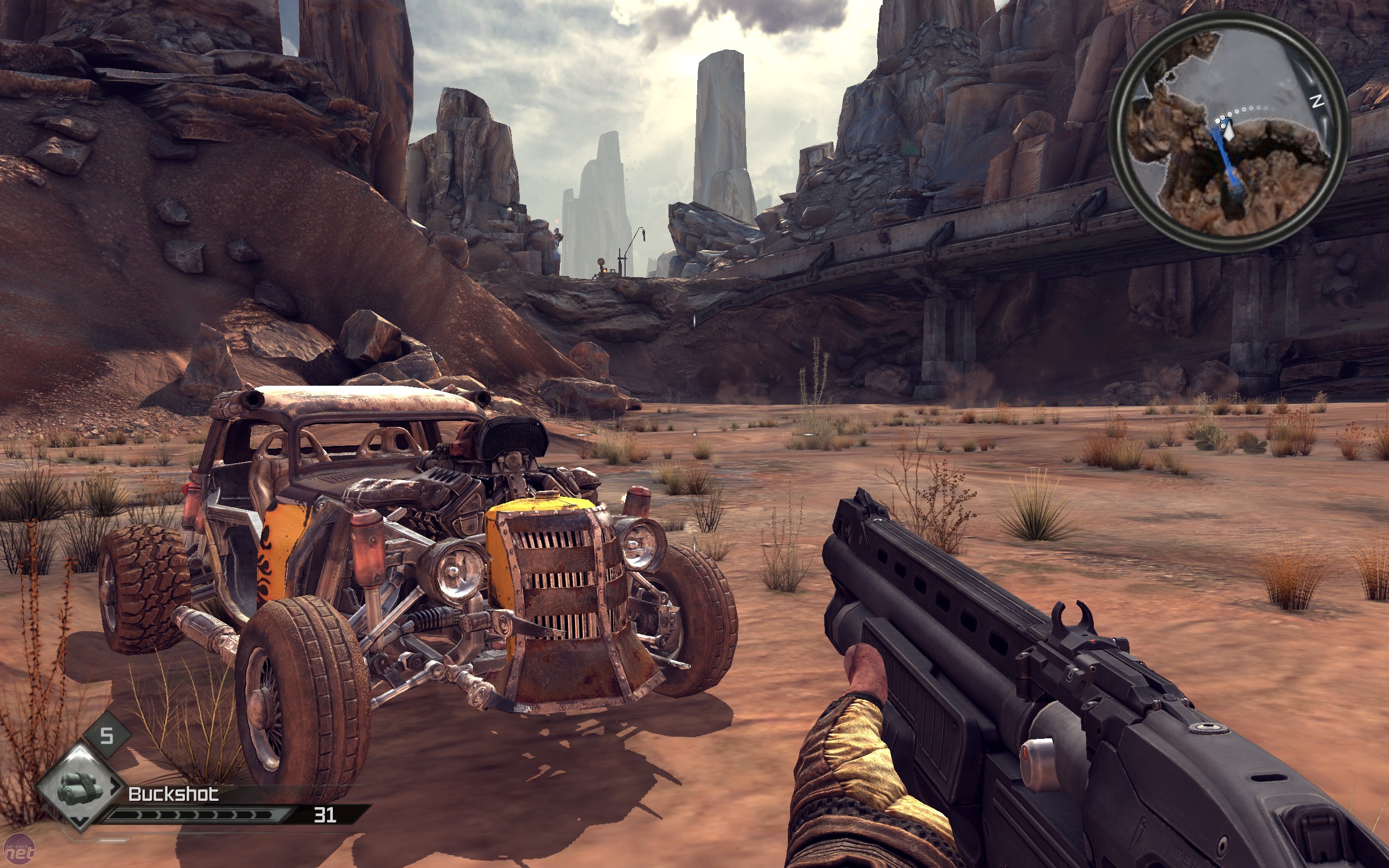
Screenshot of RAGE.


id Tech 5 came out a long time after id Tech 4, and is a far superior version of the engine. The engine was first used in id's game RAGE, which released in 2011. 

When the engine was first shown, it featured 20GB of texture data. Which meant is could support much higher texture resolutions, and a more dynamic world. The engine was also able to automatically put the textures into the memory as needed, so the developers no longer had to worry about texture limits/restraints. Which meant developing for several different platforms was easier. Many more features were also available in id Tech 5, such as softer shadows and particles, and effects like depth of field, motion blur, and post processing.

id Tech 6 (2016)

DOOM 2016
id Tech 6 is the latest version of the id Tech engine, and was made for the DOOM 2016 reboot. A modified version of the engine is being used for the upcoming game Dishonored 2.

The engine uses dynamic lighting and virtual textures (known as MegaTexture in 4 and 5) but in id Tech 6 they are much higher quality and are able to use realtime lighting and shadows. Many effects are used such as, motion blur, bokeh depth of field, HDR, bloom, shadow mapping, screen space reflections, directional occlusion and FXAA, SMAA, and TSSAA anti-aliasing.

Engine 2 - Source Engine

The Source engine is also quite well known because it has been used for Valves extremely popular games, such as Half Life and Portal. The Source engine is open and a SDK is available. Games such as Garry's Mod were made using the source engine. (GMod was developed by Facepunch Studios.)


The Source engine is the successor of Valves original engine, Gold Source aka GoldSrc. Unlike the id Tech engine, the source engine isn't updated with different numbered versions, it is just updated.

Source 2006 (Half-Life 2)

Source 2006 is the term used for the branch of the source engine that included technology used in Valves Half-Life 2: Episode 1. This engine included new effects like high dynamic range rendering and colour correction. These features were showcased in Valved tech demo-like game called Half Life 2: Lost Coast. Other smaller features like Phong shading were introduced in HL2: Ep 1.

Source 2007 (The Orange Box)

The 2007 Source engine was made for Valves new release The Orange Box, which contained Team Fortress 2, Half Life 2, Ep 1 and 2, and their new game Portal. A new threaded particle system replaced the hard-coded effects for all the games in The Orange Box. To support this, Valve created an in-process tools framework, which also supported the initial builds of Source Filmmaker, Valve's free tool that people can use to create animations using Source assets. The facial animation system was updated for "feature film and TV quality" by making it hardware-accelerated.

Since The Orange Box was released on multiple platforms, the code was refactored, and the source engine was able to take advantage of multi-core CPU's. However, until the release of Left 4 Dead 2, the performance on PC was unstable. At a later date, Valve backported the multi-core CPU support to Team Fortress 2 and Day of Defeat: Source.

The Xbox 360 version of The Orange Box was developed by Valve in house, and the Playstation 3 version was developed by Electronic Arts. The engine supported the Xbox 360 quite well, and the support for the console was built into the engines code. The PS3 version by EA had many issues, however.

Left 4 Dead Source

The next version of the Source engine is simply known as the Left 4 Dead branch. During the development of Left 4 Dead, the Source engine was completely overhauled. More features such as split screen multiplayer, more post-processing effects, event scripting and a dynamic AI director, due to further support for multi-core CPU's. This branch of the Source engine would continue to be used and updated for Alien Swarm and Portal 2. 

Source 2 Engine

Source 2 is Valves newest engine, and is yet to make it's way into more games. Currently, the only game to use the Source 2 engine is Dota 2. Source 2 features a rendering path for Vulkan API, and it will use Valves in house physics engine Rubikon.


Dota 2 running on the Source 2 engine.

Engine 3 - Unity

https://s.aolcdn.com/hss/storage/midas/fd2065d36d077eceb6061a708eb00778/202783142/Unityenginelogo.jpg


The Unity engine is very popular, since it can be used on several different platforms. It is used to develop games for the PC, consoles, websites, and mobile phones. The engine is open, and a free version and paid versions are available. 


The Unity engine uses different API's for different platforms, on Windows and Xbox it uses Direct3D, on Mac, Linux and again Windows, OpenGL is used. On phones (Android and iOS,) OpenGL ES is used. Unity can also be used on web pages. For all the different platforms, Unity features texture compression and resolution settings. There are many different effects and technical features that Unity includes such as, bump, reflection and parallax mapping, SSAO (screen space ambient occlusion.) The engine is very diverse and there are lots of options for each platform that it supports. Because of the engines diversity, it is popular among developers who develop games for multiple platforms. 

Instead of using there own development kit, Nintendo use Unity, and the engine is bundled with Wii U development kits. 

Engine features and comparisons

Rendering

Rendering is the process of using a scene/scene file to generate a 2D or 3D image. A scene file contains all the objects and scene information in a language or data structure, and things such as the viewpoint, texture, lighting and shading are stored in it. The scene file is then put into a rendering program, and a full 3D or 2D image is produced. There is something known as the "graphics pipeline," which outlines the challenges to overcome when producing a 2D image from a 3D representation along a rendering device, e.g. the GPU (graphics processing unit.) The term "rendering" is also used in video editing and is when the effects are calculated in a video editing program to produce the final video.

The Unity engine uses a rendering Pipeline.

Forward Rendering Path - The ForwardBase pass is responsible for rendering ambient light, lightmaps, main directional light and not important lights at once. It is used for any additive per-pixel lights.

Deferred Shading Path - Deferred pass renders everything that is needed for the lighting. Built in shaders, diffuse colour, specular colour, smoothness, world space normal, smission. It also adds lightmaps, reflection probes and ambient lighting.

Legacy Deferred Lighting path - PrepassBase pass renders normals & specular. PrepassFinal combines textures to render final colours, and renders lighting and emissive material properties.

Legacy Vertex Lit Rendering Path - Vertex lighting is often used on platforms that do not support programmable shaders, so multiple passes for lightmapped and non-lightmapped objects have to be written explicitly. 


  • Vertex pass is used for non-lightmapped objects. They are rendered at once using OpenGL/Direct3D.
  • VertexLMRGBM pass is used for lightmapped objects when the lightmaps are RGBM encoded (PC and console.) No realtime lighting is used.
  • VertexLMM pass is used for lightmapped objects on mobile platforms when they are double-LDR encoded. No realitime lighting is used and textures are combined with lightmap.
Source: https://docs.unity3d.com/Manual/SL-RenderPipeline.html


Artificial Intelligence

Artificial intelligence is used in video games for NPC's (non-player characters.) These are characters in the game that are controlled artificially/by the computer, and the goal is to have them act as human as possible. Since these characters are being artificially controlled, it is possible that they can be way too good and make the game unfair. In first person shooter games like Counter Strike, the skill of the AI needs to be toned down, otherwise their accuracy will be perfect and beyond what is achievable by normal humans.

AI is handled differently in different engines, for example, Unreal Engine 4 uses something known as "behaviour trees." Behaviour trees contain different actions that branch off to more actions, and they all connect together. I will put a screenshot below. Blackboards are also used, which is the AI's memory. It stores all the values that the behaviour tree needs to use.


A simpler engine like GameMaker uses drag and drop. When you go into the properties of an object, you are presented with a menu with lots of options and categories on the right side. You simply drag and drop the options you want into the events column on the left. You can edit the values etc. GameMaker also allows users to use code, however since GameMaker is good beginner tool for game developers, drag and drop is quite popular.


Middleware


Middleware is software that provides additional features and services to applications, and is often called "software glue." In gaming, middleware is used in game engines to handle certain technical aspects of the game. An example of a popular type of middleware is the Havok physics engine, which is an engine that specialises in handling physics (collision, rag-dolls, how objects move and react etc.) Havok has been used in over 600 video games, and is also used in software like Maya.


Another middleware program has started to become increasingly popular over the years is Nvidia GameWorks, which includes some really nice effects. GameWorks is made up of several components.

VisualFX - This handles the rendering of water, fire, smoke, depth of field, FaceWorks, HairWorks, HBAO+ (ambient occlusion) and TXAA (temporal anti-aliasing.)

PhysX - For physics and detailed particles. Below is a screenshot of Borderlands 2 which uses PhysX for high tech, detailed particles. PhysX is also used for fluids. 


OptiX - For lighting and rays.

CoreSDK - Allows better integration for Nvidia features in games.


Wednesday, 14 September 2016

Unit 6: Critical Approaches To Creative Media Products

Gaming and Motivation
Gamer's are into all kinds of games, and everyone has certain things in games that motivate them. It could be getting their character to the max level in an RPG, or working as a team to win a match in Counter Strike. I am a gamer, so obviously there are things that motivate me too.

Different Types of Gaming Motivation
While I personally get motivated by team play and objective based games, there are a few different things that can motivate people.

Action and Excitement - Gamers who like action and excitement are driven by having lots of guns and explosives, and they like to cause lots of mayhem. They like games that surprise them, and give them an adrenaline rush. Some examples are Call of Duty and Battlefield.

Social - Gamers that enjoy teamwork and communication in games like Counter-Strike, or just chatting casually to other players in an MMO like World of Warcraft.

Mastery - Games that involve the player spending time learning how the game works, and mastering the gameplay. For example, challenging games like Dark Souls, that require a decent amount of skill. They may also like games that require lots of planning, like Cities: Skylines.

Achievement - Gamers who like to spend time completing as much of the game as possible. Exploring every nook and cranny of the game world, completing every mission and getting every achievement. Open world RPG games like Fallout are a good example.

Creativity - Gamers who like to try out lots of things in a game and do lots of experimenting. They may spend lots of time building in a game like Minecraft, or creating a character or putting skill points into a skill tree.

Immersion - Gamers who like to feel like they are part of the game world, and get involved with the characters and the story. A good example is Fallout, and RPG game where you can play however you want and treat the other characters however you want. It also has a very good atmosphere.


What Motivates Me?

I am mainly into action and team oriented games, so my motivations are often related to in game objectives. For example, I have played a lot of Counter Strike, so I really enjoy grouping up with friends and communicating to win rounds/matches. This is also the same with Overwatch, where your team have to escort a payload to a certain point, or try to hold a capture point longer than the enemy team. You have to make sure you play as a useful character that works well with the other characters on your team. I also enjoy playing RPG's and I like to explore as much of the world as possible, and complete as many quests as possible. Below you can see my results from completing a survey about this topic. 


https://apps.quanticfoundry.com/gamerprofile/d0e85684e4e2488e9dba56b1c43fa237/